RT Machine Co

CNC

You are not logged in. [ Login ] Why log in
(NOTE: Login is not required to post)

Conquest 250 error message s114

1/15/26       
Christopher Sokolic Member

We have had our Conquest 250 for about 25 years I have 2 error messages alternating first one s114 limit axis y not activated and s052 tool magazine movement not ok can't remember how to fix this any help would be appreciated

1/16/26       #2: Conquest 250 error message s114 ...
Alex_Zhang Member

The S114 Y-axis error is likely just an interlock preventing movement because of the S052 ATC error. The machine is protecting itself because it thinks the tool changer isn't 'Home'.

On a machine that age, check the proximity switches or microswitches on the tool changer carousel/arm. Old coolant tends to turn into glue after 25 years and stick those switches. If the machine doesn't see the 'ATC Home' signal, it won't let you move Y.

Also, double-check your air pressure. Sometimes a slight drop prevents the carousel from snapping fully into position to trigger the sensor.

1/16/26       #3: Conquest 250 error message s114 ...
Christopher Sokolic Member

Alex thanks for responding when I cut the air and line up the ATC pins with the sensors then turn the machine on they both light up after checking our air pressure it also seems fine. The only thing we adjusted was the air sensors above the main arm to fix a different problem this all started because our roof leaked and the controller got wet after 3 days of drying and cleaning we were able to get it running first thing we did was flycut picked up no. 8 with no problem when we went to cut out parts it started this problem. Next morning I come in and did three tool changes and it worked came back later to start and again with the error messages

1/19/26       #4: Conquest 250 error message s114 ...
Alex_Zhang Member

The wet controller detail changes the picture significantly. That 'works for a bit, then fails' behavior is classic for moisture ingress or a borderline connection.

Since you mentioned you adjusted the sensors above the main arm: I would double-check the gap/distance on those sensors you moved. If they are set right on the 'edge' of their detection range (hysteresis), the vibration from the machine running or even thermal expansion could be causing them to flicker off, triggering the S052/S114 logic again.

Regarding the water: 3 days of drying is good, but moisture loves to wick into the connectors/plugs themselves and stay there long after the board looks dry. If the sensor adjustment doesn't fix it, I’d pull the plugs on that circuit, check for any green corrosion, and hit them with some contact cleaner/air.

1/19/26       #5: Conquest 250 error message s114 ...
Christopher Sokolic Member

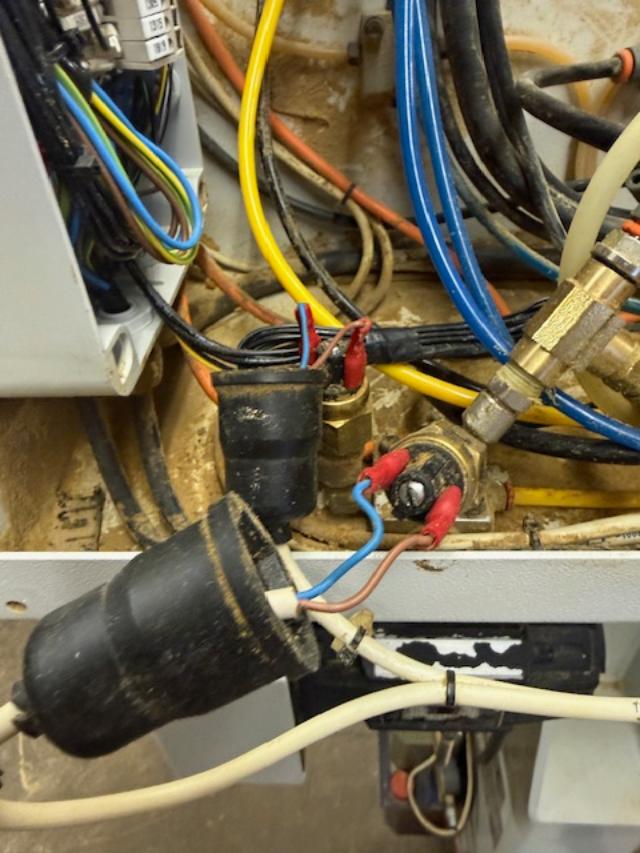
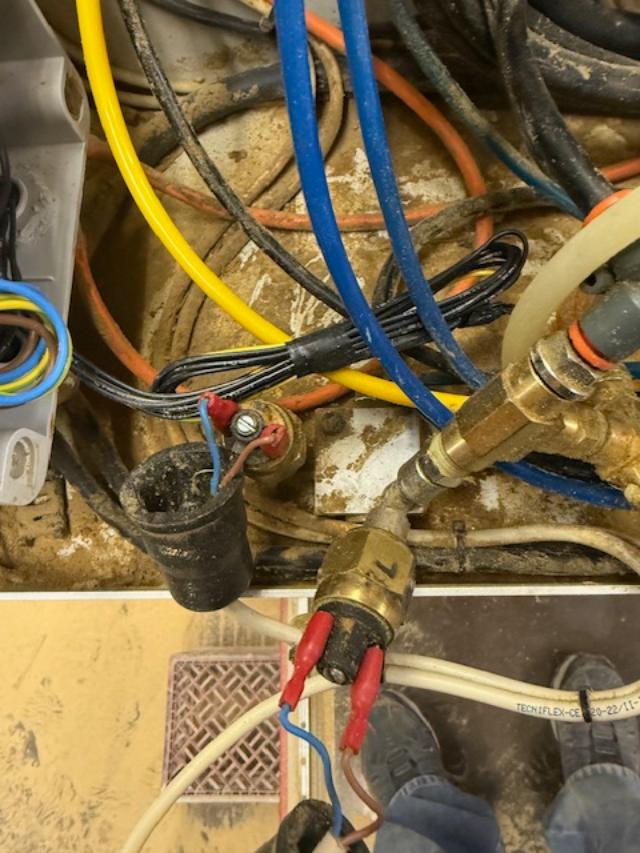
Alex I checked my connections and blew them out no difference then I checked my air sensors tried different settings to no avail then I decided to try and drill some holes and when I did the router moved a few inches and I received this s086 head 2 contactor anomaly not sure if this means anything. I attached a photo of the air sensors


View higher quality, full size image (640 X 853)
1/20/26       #6: Conquest 250 error message s114 ...
Alex_Zhang Member

Thanks for the photo. Those pressure switches look a bit weathered with some exposed terminals, but that new S086 error is the 'smoking gun' we’ve been looking for.

S086 (Head 2 Contactor Anomaly) confirms the issue is likely inside the main electrical cabinet where the water damage occurred, rather than out on the machine sensors.

This error means the controller tried to turn on Head 2 (sent the 24V signal), but the feedback signal from the contactor didn't return. Given the water history, here is what likely happened:

Rust/Sticking: Moisture has rusted the internal spring or core of the contactor for Head 2, so it’s physically sticking and not pulling in fast enough.

Corroded Contacts: The 'Auxiliary Contact' (the small feedback block on the side/top of the main contactor) has corroded internals and isn't conducting signal.

Safety First: With power OFF, find the contactor labeled for Head 2. Manually push the plunger in. Does it feel 'crunchy' or sticky? If so, swap that contactor. That should clear your S086 and likely the other phantom errors too.

1/20/26       #7: Conquest 250 error message s114 ...
Christopher Sokolic Member

Alex thanks, the drill bank contactor was the problem I pushed it on and off 4 times and loosen and tighten the terminals and low and behold it started working

1/20/26       #8: Conquest 250 error message s114 ...
Christopher Sokolic Member

Spoke too soon just went out to try again and it won't pocket tool # 1same two error messages as originally posted when i ran the program this morning there was no tool in the head it drilled the holes first then went and picked tool #2 made the dado then went and pocketed #2 and picked tool #1 cut the perimeter and went to home now it won't pocket tool #1 and the ATC not lining up

1/21/26       #9: Conquest 250 error message s114 ...
Alex_Zhang Member

Glad to hear we found the culprit, Christopher! But that 'spoke too soon' moment is exactly why water-damaged electrical components are so tricky.

The fact that working the contactor manually made it run for a cycle proves that the contactor is indeed the failure point.

Here is what is happening: Even though you freed it up momentarily, the internal contacts (or the coil mechanism) are likely pitted or still sticky from the corrosion. When it fails to engage fully or releases too slowly during the tool change sequence, the PLC misses the timing window, the carousel drifts out of position, and you get that S114/S052 error combo again because the sequence got interrupted mid-air.

My strong recommendation: Stop fighting it and replace that contactor immediately. Cleaning it is only a temporary band-aid. Once you swap in a fresh contactor (and check the auxiliary block on top of it), I am 99% sure your ATC alignment and pocketing issues will vanish for good.

It’s a cheap part compared to the downtime it's causing you!

1/22/26       #10: Conquest 250 error message s114 ...
Christopher Sokolic Member

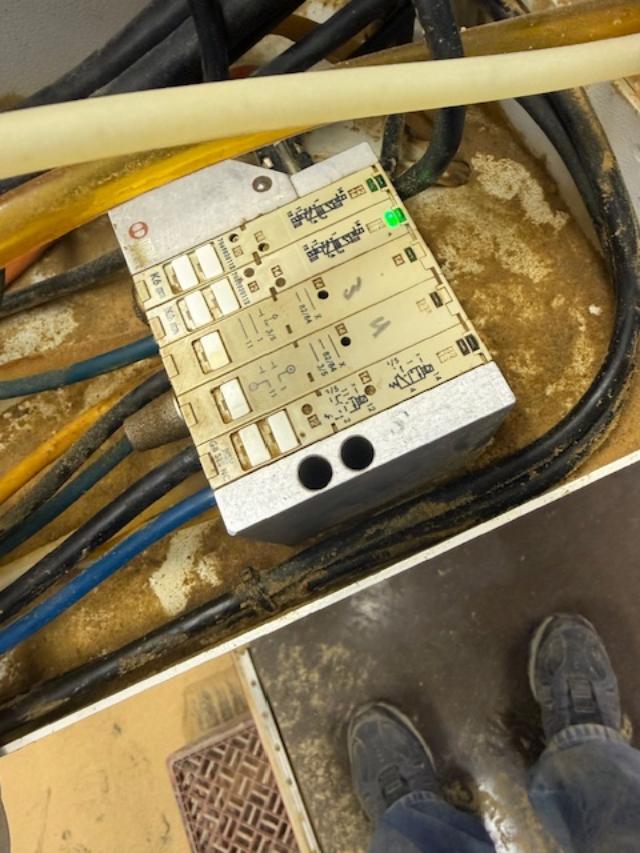
Alex finally received the contactor and auxiliary contact replaced both of them didn't work I'm at a loss heading back to the air when I close the left air sensor in the picture it kills the machine when I close the right one nothing happens I also sent a picture of the block the air lines go into only one green light comes on we have had problems with that before


View higher quality, full size image (640 X 853)


View higher quality, full size image (640 X 853)

1/22/26       #11: Conquest 250 error message s114 ...
Alex_Zhang Member

Sorry to hear the contactor didn't be the magic bullet for the whole system, Christopher. However, replacing it was necessary to clear that S086 hard fault, so it wasn't a waste—we are just peeling back the layers of this "water damage onion."

The new info about the Right Air Sensor doing "nothing" and the Solenoid Block is actually very helpful. Here is the logic:

1. The "Right" Sensor (The Silent One): If triggering the Left sensor kills the machine (E-Stop loop), that represents a "Safe/Home" state. The Right sensor usually confirms the opposite state (e.g., Drawbar Open, or ATC Arm Extended). If you trigger that Right sensor manually and nothing happens (no change on the diagnostic screen, no relay click), the controller doesn't know the tool release cylinder has done its job. It waits for that signal, times out, and throws S052.

Test: Can you put a multimeter on the terminals of that Right sensor? See if it's actually switching 24V (or 110V) when you actuate it. The sensor itself might have died from the moisture.

2. The Solenoid Valve Block: You mentioned only one green light is on. When the machine attempts to pocket the tool, do you see a second light flicker on that block?

If NO light appears: The signal isn't leaving the controller (or is lost in a corroded wire/relay on the way there).

If a light DOES appear but nothing moves: The solenoid valve spool is stuck (common with old sticky air/water).

3. The Manual Override Trick: Most of those older solenoid blocks (like the one in your photo) have small manual override buttons or pin-holes on the valve body itself (usually near the coil).

CAUTION: With air on but spindle STOPPED, try carefully pushing the manual button on the valve that corresponds to the ATC arm/drawbar.

If the mechanism moves smoothly when you push the button manually, your pneumatics and mechanics are fine. The issue is strictly electrical (the "Right" sensor not reporting, or the solenoid not receiving the command).

Focus on that Right sensor first—if the brain doesn't know the arm is ready, it won't let the hand move!

1/23/26       #12: Conquest 250 error message s114 ...
Christopher Sokolic Member

Alex when I screw the right sensor all the way in it does kill the machine when I check voltage on the air pressure sensors I get o volts when the set screws are turn out when I screw them all the way in it kills the machine and I get 24V
I would buy new ones but don't know where to get the exact same thing from both of them have different size threads on them. When I checked the solenoid valves I start a tool change and the far right lights up but the machine still stops. The light stays lit until you clear the error messages. I couldn't find the bypass on the outside one so that's all I have for now

1/26/26       #13: Conquest 250 error message s114 ...
Alex_Zhang Member

This is actually great progress, Christopher.

Sensors are cleared: The fact that you get 24V and kill the machine when adjusting them confirms the wiring and the sensors themselves are functional. You don't need to buy new ones; they just need to be dialed back to the correct pressure threshold later.

The "Light On" is the key: You said the far-right light on the solenoid block lights up when you command a tool change.

This confirms the controller is sending the signal. The "brain" is working!

But the machine still stops.

Diagnosis: The electrical signal is getting to the coil, but the valve spool is physically stuck.

Given the age of the machine (25 years) plus the recent moisture, the lubricant inside that valve body has likely turned into a sticky paste. The magnetic coil isn't strong enough to overcome that friction.

Action Plan: Focus entirely on that specific valve with the light.

Tap Test: While the light is ON (during the error state), try giving the side of that valve body a firm tap with the handle of a screwdriver. Sometimes the vibration is enough to unstick the spool.

Manual Actuation: I know you couldn't find the button, but look closely at the center of the coil nut or the end of the valve. There is almost always a tiny pinhole. You can push it with a small Allen key.

The Fix: You likely need to take that specific valve apart and clean the spool with WD-40 or replace it. It’s a mechanical jam, not an electrical ghost anymore.

1/26/26       #14: Conquest 250 error message s114 ...
Christopher Sokolic Member

Alex that valve was sticking took it out and clean it and sprayed it with WD40 seems like it had burs on it so I ordered a new one from Radcliffe says it won't be here till next Monday hoping it fixes it. Not sure if taking it apart would help any. After I cleaned and lubricated it. It came within a couple of inches of doing a tool change before it stopped

1/27/26       #15: Conquest 250 error message s114 ...
Alex_Zhang Member

That makes perfect sense, Christopher.

Once a valve spool has physical burrs or scoring, no amount of WD-40 will bring it back to 100% reliability. It creates friction that you might not feel by hand, but under air pressure, it binds up just enough to slow down the movement and trigger the timeout error.

Since the new part is already on its way, I wouldn't waste another minute fighting with the old one. You have successfully identified the root cause, which is the hardest part of the battle.

Take a breath, enjoy the weekend, and swapping that valve on Monday should be the final fix!

2/2/26       #16: Conquest 250 error message s114 ...
Christopher Sokolic Member

Alex the valve we are replacing controls the head when I put the new one in there the head would not move using M11 and M12 so I told mark to put in the command and I was going to move the wires a little bit Alex I just barely touched it and it came on. The head goes up and down with the proper command so it does the tool changes with no problem I can't thank you enough the machine is running only problem now is I must have a short somewhere right now i'm running and cutting once I get caught up I'll chase it down thank you again

2/4/26       #17: Conquest 250 error message s114 ...
Alex_Zhang Member

That is fantastic news, Christopher! I am glad to hear the machine is finally making chips again.

The fact that it worked when you moved the wires confirms the new valve is good. That sensitivity suggests the "short" is likely a physical connection issue. Given the history of water damage, the moisture probably caused some oxidation on the connector pins or loosened a crimp.

When you have time to chase it down later, check the pins inside that connector plug. Sometimes they back out of the plastic housing just slightly and cause intermittent contact.

For now, catching up on production is the priority. I am happy I could help you navigate through those S114 and S052 errors. Good luck with the work!


Post a Response
  • Notify me of responses to this thread
  • Subscribe to email updates on this Forum
  • To receive email notification of additions to this forum thread,
    enter your name and email address, and then click the
    "Keep Me Posted" button below.

    Please Note: If you have posted a message or response,
    do not submit this request ... you are already signed up
    to receive notification!

    Your Name:
    E-Mail Address:
    Enter the correct numbers into the field below:
     

    Date of your Birth:


    Return to top of page

    Buy & Sell Exchanges | Forums | Galleries | Site Map

    FORUM GUIDELINES: Please review the guidelines below before posting at WOODWEB's Interactive Message Boards (return to top)

  • WOODWEB is a professional industrial woodworking site. Hobbyist and homeowner woodworking questions are inappropriate.
  • Messages should be kept reasonably short and on topic, relating to the focus of the forum. Responses should relate to the original question.
  • A valid email return address must be included with each message.
  • Advertising is inappropriate. The only exceptions are the Classified Ads Exchange, Machinery Exchange, Lumber Exchange, and Job Opportunities and Services Exchange. When posting listings in these areas, review the posting instructions carefully.
  • Subject lines may be edited for length and clarity.
  • "Cross posting" is not permitted. Choose the best forum for your question, and post your question at one forum only.
  • Messages requesting private responses will be removed - Forums are designed to provide information and assistance for all of our visitors. Private response requests are appropriate at WOODWEB's Exchanges and Job Opportunities and Services.
  • Messages that accuse businesses or individuals of alleged negative actions or behavior are inappropriate since WOODWEB is unable to verify or substantiate the claims.
  • Posts with the intent of soliciting answers to surveys are not appropriate. Contact WOODWEB for more information on initiating a survey.
  • Excessive forum participation by an individual upsets the balance of a healthy forum atmosphere. Individuals who excessively post responses containing marginal content will be considered repeat forum abusers.
  • Responses that initiate or support inappropriate and off-topic discussion of general politics detract from the professional woodworking focus of WOODWEB, and will be removed.
  • Participants are encouraged to use their real name when posting. Intentionally using another persons name is prohibited, and posts of this nature will be removed at WOODWEB's discretion.
  • Comments, questions, or criticisms regarding Forum policies should be directed to WOODWEB's Systems Administrator
    (return to top).

    Carefully review your message before clicking on the "Send Message" button - you will not be able to revise the message once it has been sent.

    You will be notified of responses to the message(s) you posted via email. Be sure to enter your email address correctly.

    WOODWEB's forums are a highly regarded resource for professional woodworkers. Messages and responses that are crafted in a professional and civil manner strengthen this resource. Messages that do not reflect a professional tone reduce the value of our forums.

    Messages are inappropriate when their content: is deemed libelous in nature or is based on rumor, fails to meet basic standards of decorum, contains blatant advertising or inappropriate emphasis on self promotion (return to top).

    Libel:   Posts which defame an individual or organization, or employ a tone which can be viewed as malicious in nature. Words, pictures, or cartoons which expose a person or organization to public hatred, shame, disgrace, or ridicule, or induce an ill opinion of a person or organization, are libelous.

    Improper Decorum:   Posts which are profane, inciting, disrespectful or uncivil in tone, or maliciously worded. This also includes the venting of unsubstantiated opinions. Such messages do little to illuminate a given topic, and often have the opposite effect. Constructive criticism is acceptable (return to top).

    Advertising:   The purpose of WOODWEB Forums is to provide answers, not an advertising venue. Companies participating in a Forum discussion should provide specific answers to posted questions. WOODWEB suggests that businesses include an appropriately crafted signature in order to identify their company. A well meaning post that seems to be on-topic but contains a product reference may do your business more harm than good in the Forum environment. Forum users may perceive your references to specific products as unsolicited advertising (spam) and consciously avoid your web site or services. A well-crafted signature is an appropriate way to advertise your services that will not offend potential customers. Signatures should be limited to 4-6 lines, and may contain information that identifies the type of business you're in, your URL and email address (return to top).

    Repeated Forum Abuse: Forum participants who repeatedly fail to follow WOODWEB's Forum Guidelines may encounter difficulty when attempting to post messages.

    There are often situations when the original message asks for opinions: "What is the best widget for my type of shop?". To a certain extent, the person posting the message is responsible for including specific questions within the message. An open ended question (like the one above) invites responses that may read as sales pitches. WOODWEB suggests that companies responding to such a question provide detailed and substantive replies rather than responses that read as a one-sided product promotion. It has been WOODWEB's experience that substantive responses are held in higher regard by our readers (return to top).

    The staff of WOODWEB assume no responsibility for the accuracy, content, or outcome of any posting transmitted at WOODWEB's Message Boards. Participants should undertake the use of machinery, materials and methods discussed at WOODWEB's Message Boards after considerate evaluation, and at their own risk. WOODWEB reserves the right to delete any messages it deems inappropriate. (return to top)


  • Forum Posting Help
    Your Name The name you enter in this field will be the name that appears with your post or response (return to form).
    Your Website Personal or business website links must point to the author's website. Inappropriate links will be removed without notice, and at WOODWEB's sole discretion. WOODWEB reserves the right to delete any messages with links it deems inappropriate. (return to form)
    E-Mail Address Your e-mail address will not be publicly viewable. Forum participants will be able to contact you using a contact link (included with your post) that is substituted for your actual address. You must include a valid email address in this field. (return to form)
    Subject Subject may be edited for length and clarity. Subject lines should provide an indication of the content of your post. (return to form)
    Thread Related Link and Image Guidelines Thread Related Links posted at WOODWEB's Forums and Exchanges should point to locations that provide supporting information for the topic being discussed in the current message thread. The purpose of WOODWEB Forums is to provide answers, not to serve as an advertising venue. A Thread Related Link that directs visitors to an area with inappropriate content will be removed. WOODWEB reserves the right to delete any messages with links or images it deems inappropriate. (return to form)
    Thread Related File Uploads Thread Related Files posted at WOODWEB's Forums and Exchanges should provide supporting information for the topic being discussed in the current message thread. Video Files: acceptable video formats are: .MOV .AVI .WMV .MPEG .MPG .MP4 (Image Upload Tips)   If you encounter any difficulty when uploading video files, E-mail WOODWEB for assistance. The purpose of WOODWEB Forums is to provide answers, not to serve as an advertising venue. A Thread Related File that contains inappropriate content will be removed, and uploaded files that are not directly related to the message thread will be removed. WOODWEB reserves the right to delete any messages with links, files, or images it deems inappropriate. (return to form)
    Onsrud Cutter Vortex Tool Company T-Tool USA Limtech Industries, Inc.
    Sponsors
    • Safety Speed Manufacturing
      Economical Vertical Panel Saws, Panel Routers, Edgebanders and Widebelt Sanders
    • Vexor Custom Woodworking Tools, Inc.
      Custom and Standard Router Bits, Shaper Cutters, Profile Knives, Multi Profile Insert Tooling and More
    • Limtech Industries, Inc.
      CNC Routers, Machinery for Woodworking, Plastic and Other Non-ferrous Metal Machining Applications
    • EX-FACTORY INC.
      Offering New & Used Woodworking Machinery including Auctions & Liquidations
    • Holz-Her US Inc.
      Custom Edgebanders, Vertical Panel Saws, CNC Beam Saws, Wide Belt Sanders, CNC Point to Point Boring Machines, CNC Routers
    • Colonial Saw
      North American Supplier of Striebig Panel Saws, Lamello Specialty Tools and a Wide Range of Saw and Tool Grinding Machinery
    • MachineryMax
      New and Used Machinery for the Professional Woodworker
    • Professional Machinery Group
      New and Used Machinery Serving the Needs of the Professional Woodworker
    • Industrial CNC
      Affordable, Easy, Industrial Grade CNC Routers for Woodworking and Cabinetmaking - Free Lifetime Support
    • American National Knife
      Manufacturer of HSS and Carbide Tipped Woodworking Knife Sets for Planers, Jointers, Molders, Shapers
    • VortexTool Co. Inc.
      Manufacturers of Custom Cutting Tools, and Distributors of Major Cutting Tool Brands
    • Weinig Group-USA
      Wood Moulders and Knife Grinding Equipment
    • Rangate
      Woodworking Machinery, Supplies and Knowledge

    Become a Sponsor today!